A reader for your second language

Let reading be reading.
Let learning be lighter.

Solaread translates the words you do not know, right inside the line, and leaves the rest alone. No copy, no paste, no switching tabs. Just the book, the paper or the article, with the help you actually need.

  • Free to start, in your browser today
  • EPUB, TXT and PDF, plus web articles and YouTube transcripts
  • A 30-second vocabulary test tunes it to you

Inline · predicted wordsA neural network learns a representation(表征) of its input by adjusting millions of parameters(参数) through gradient descent(梯度下降), one small step at a time.

Interlinear · words you savedOverfitting过拟合 happens when a model memorizes记住 the training data instead of generalizing泛化 to unseen未见过的 examples.

Real Solaread rendering. Hover a translation for a context-based explanation; the popover leaves when your mouse does.

The problem

Reading in another language should not feel like work

Most of the effort is not the language. It is the interruptions.

  • Every lookup breaks the flow

    Copy the word, switch to a translator, paste, read the meaning, switch back, find your line. Two clicks and a keyboard trip, dozens of times per chapter.

  • Translated editions depend on the translator

    A translated book is someone else's reading of it. When the translation is uneven, the author disappears behind it. The original is where the voice is.

  • Memorized terms do not stick

    Course vocabulary crammed for one exam is gone by the next. Words you meet in context, in the paper you are actually reading, stay.

  • Attention does not come back for free

    Once the flow breaks, the phone wins. For some readers one interruption costs the whole session, and the chapter never gets finished.

How it works

Help that appears inside the line, only where you need it

Solaread reads with you. It predicts which words you do not know, translates those, and gets out of the way.

Personalized prediction

A model that knows which words you need

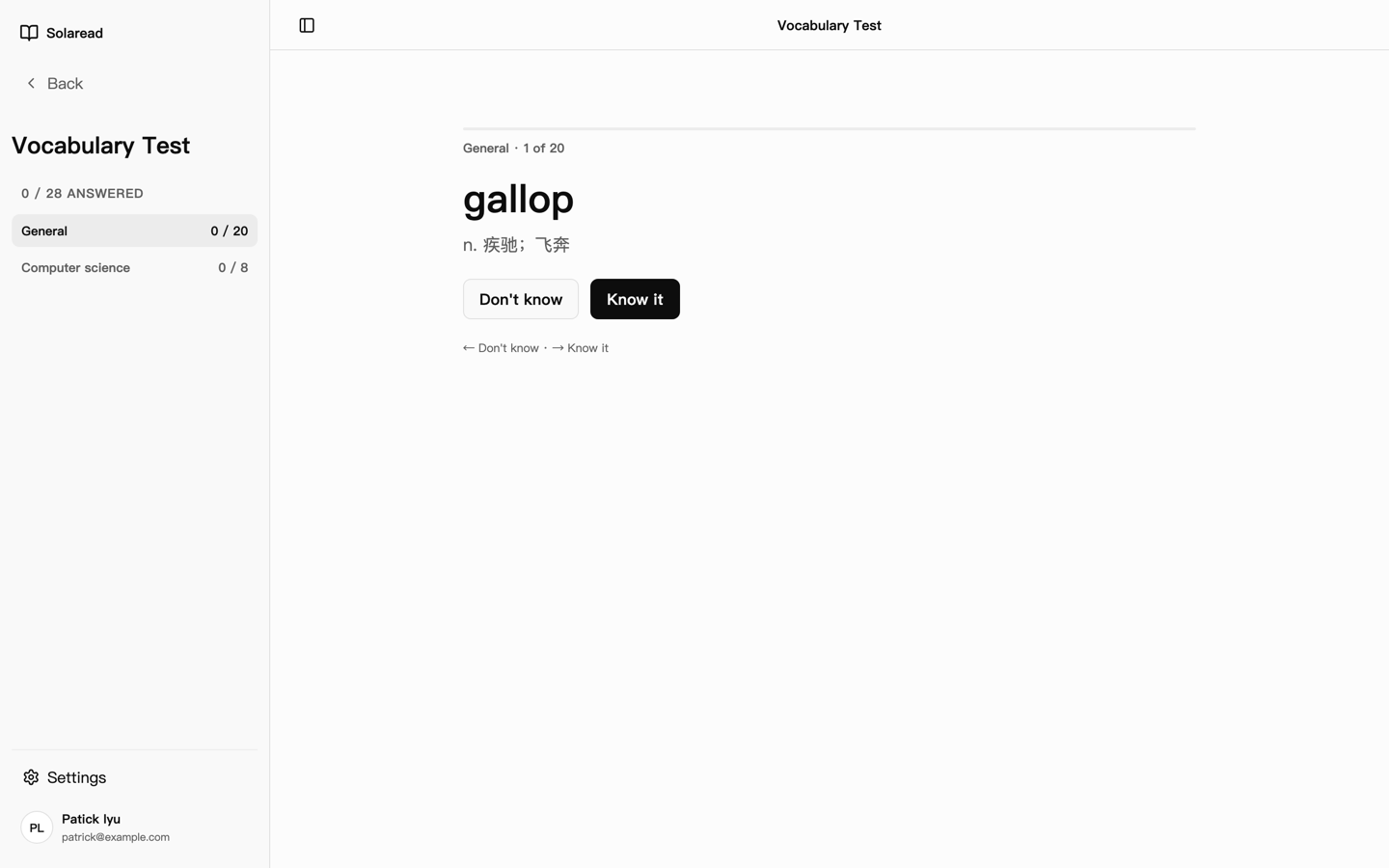
After you sign up, a vocabulary test that takes about 30 seconds tells Solaread where you stand. From then on, every book is scanned against your level: the model predicts the words you probably do not know and translates only those.

As you read and react, it adjusts. As your vocabulary grows, it translates less. The help shrinks as you do not need it.

  • About 30 seconds to calibrate, refine any time
  • Separate levels for general and professional vocabulary: economics, finance, law, medicine, computer science
  • Adapts to your feedback book by book
The Solaread vocabulary test showing a word card with Don't know and Know it actions
The vocabulary test: one word at a time, two answers, done in about 30 seconds.

Inline and interlinear

Translations in the line, not in a side panel

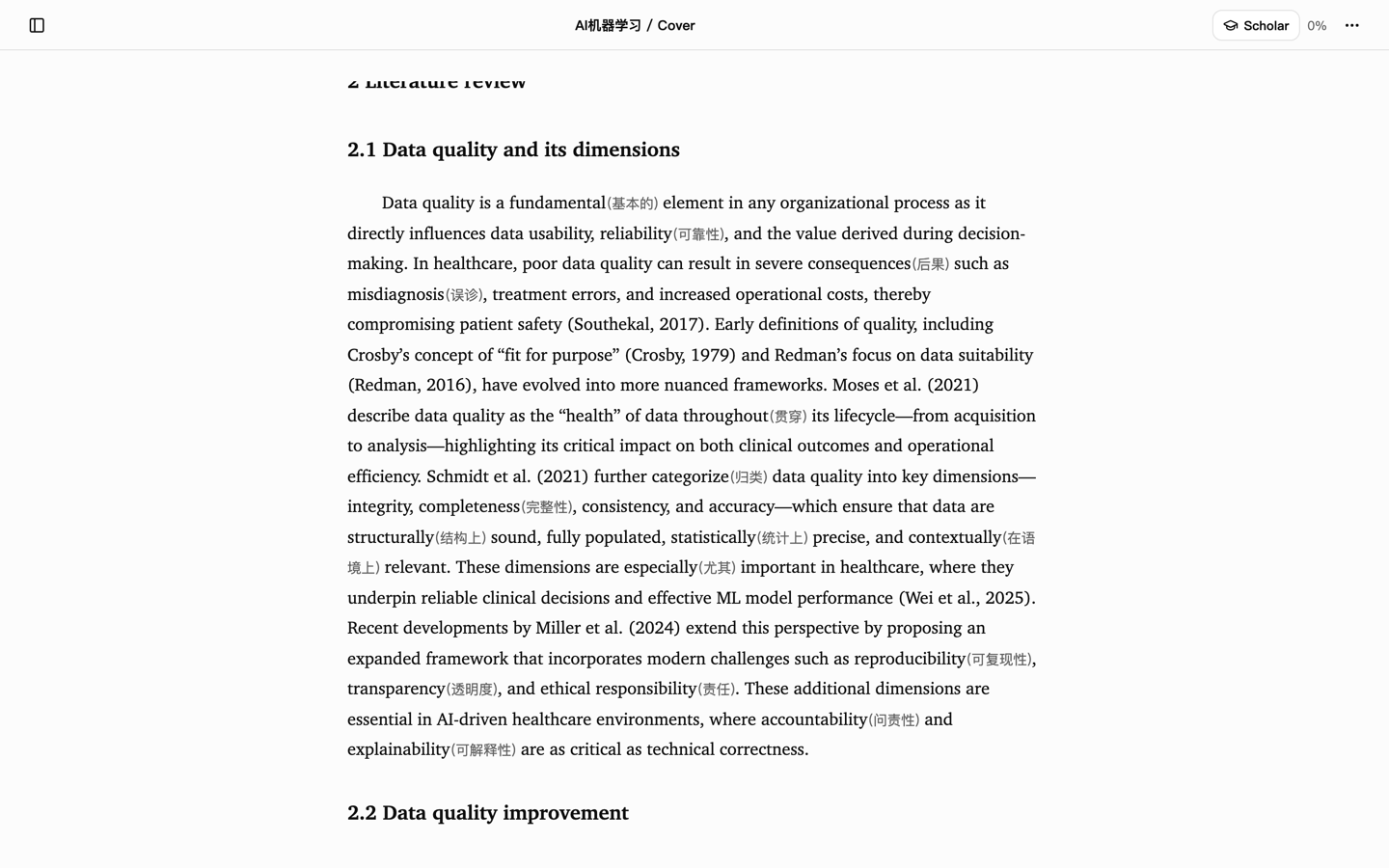
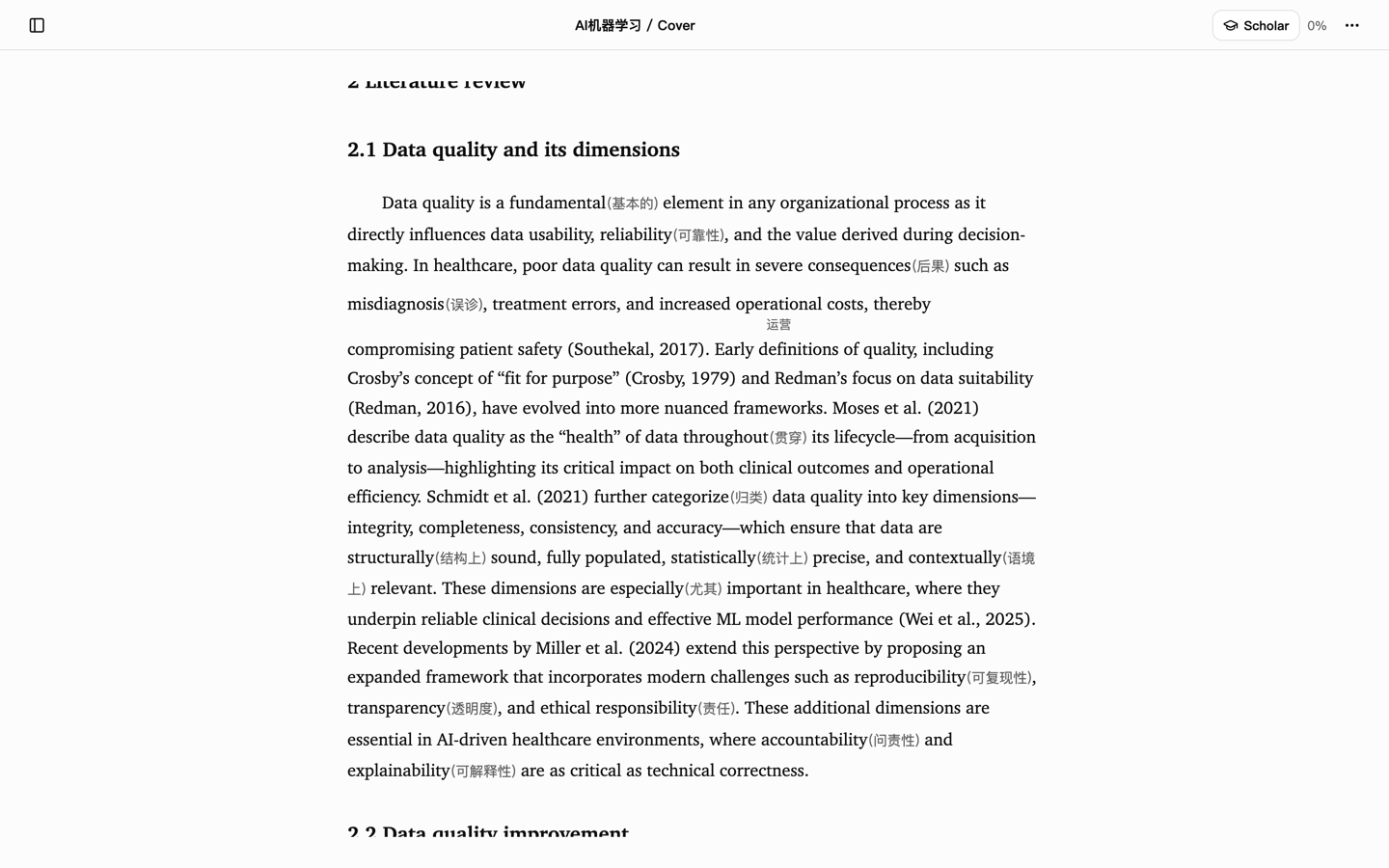
Two kinds of help, both inside the text. Inline glosses are what the model predicts you need: a short translation in parentheses right after the word. Interlinear glosses sit underneath the line for the words you chose to save, so they stay with the sentence when you come back to it.

Either way the translation is inserted with a smooth animation that does not reflow the paragraph you are reading. Your eyes never leave the page.

Solaread reader showing inline glosses in parentheses after predicted words
Inline: the model's predicted words get a gloss after the word.
Solaread reader showing interlinear glosses beneath the line
Interlinear: words you saved keep their gloss under the line.

Hover for context

Move the mouse, get the explanation

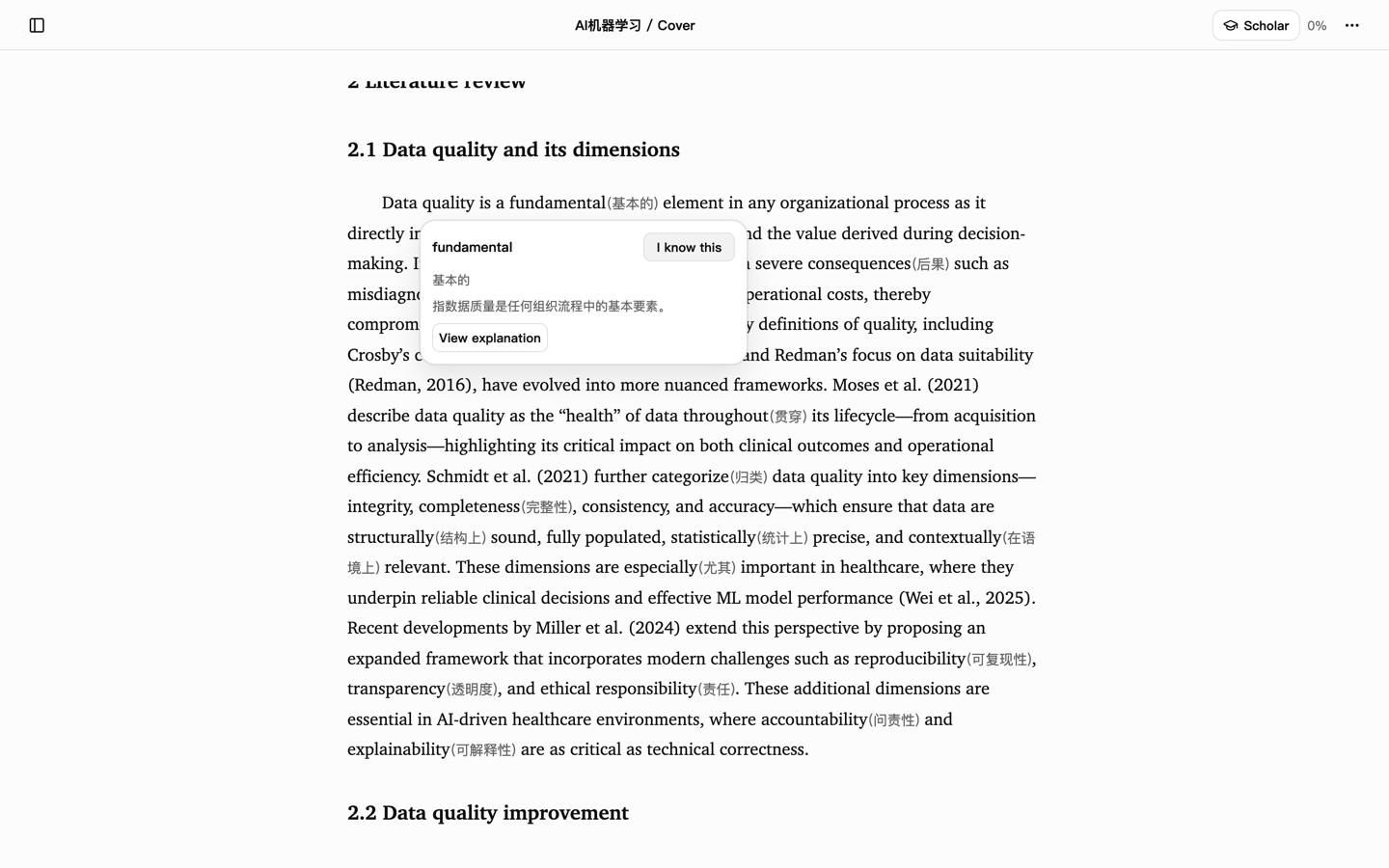
When a one-word gloss is not enough, hover it. A small popover explains the term in the context of the sentence you are reading. Move away and it is gone. No click, no selection, no modal.

If the model missed a word, double-click it, or select even one letter of it, and the same popover appears with the translation and the option to save it.

Word list

Save a word, and the line keeps its gloss

Adding a word to your list inserts an interlinear gloss on the spot, so the meaning is still there when you reread the passage next week. Your choice also flows back into the model, which learns what you tend to save and what you already know.

My Notes keeps every saved word and excerpt bound to its exact position, so you can return to the sentence it came from.

Solaread popover showing a context explanation with Add to word list and Mark as known actions
The popover: explanation, save, or mark as known.

Your library

EPUB, TXT and PDF, synced across your devices

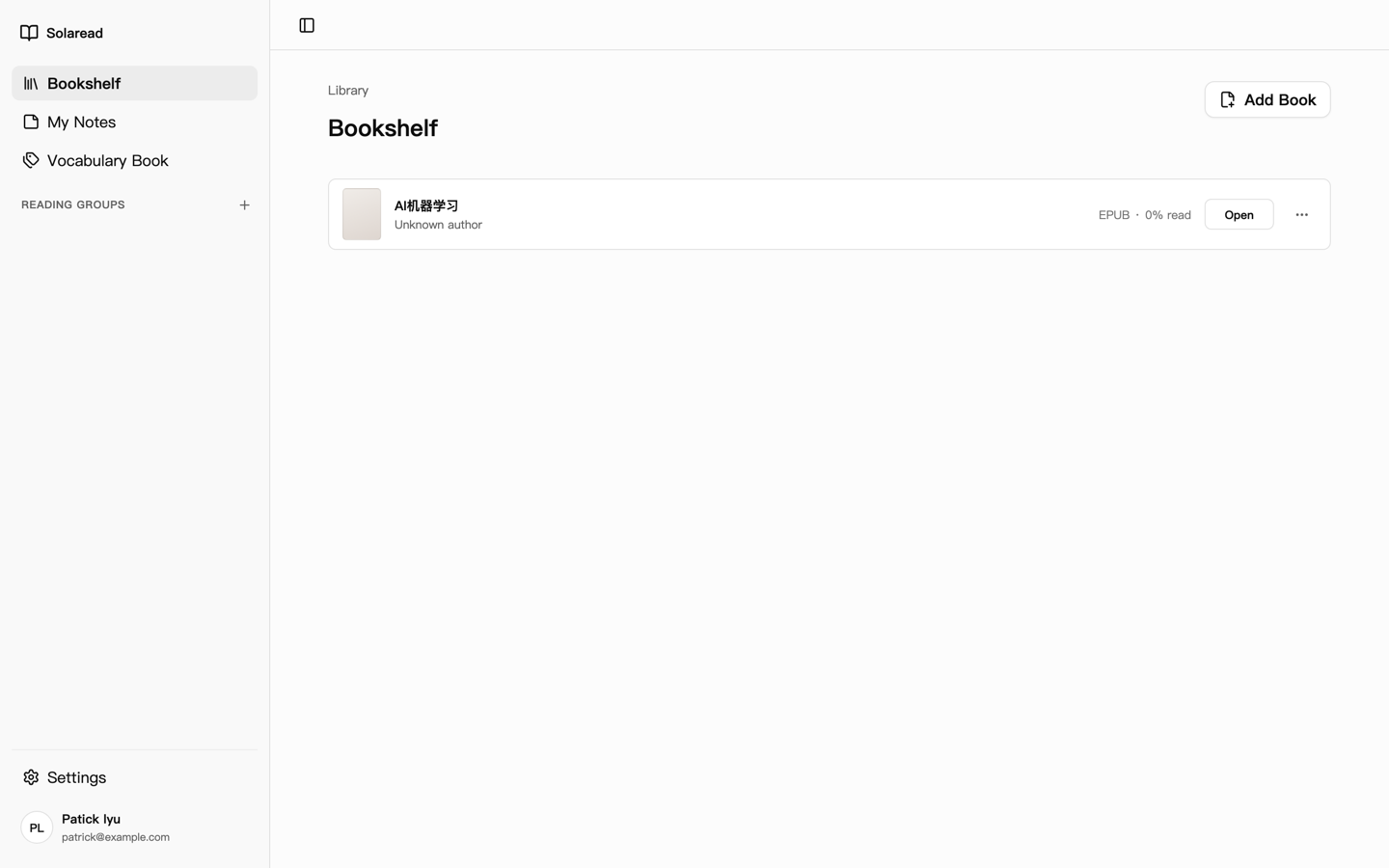
Import the book you already own. Papers in PDF are parsed into readable text where possible, with a page-faithful fallback where not. Your library, reading position, highlights and notes sync through your account, so the chapter you stopped on your laptop is waiting on your desktop.

  • EPUB, TXT and PDF import
  • Cloud sync for books, progress, highlights and notes
  • Reading position restored on every device
The Solaread bookshelf listing imported books with format and progress
The bookshelf: one row per book, with format and progress.

Chrome extensionComing soon

Save it now, read it properly later

The Solaread extension sends the article you do not have time for, or the YouTube video you would rather read, straight to your bookshelf as text. Open it later in the reader and it gets the same glossing as a book.

The extension is in testing with the Solaread beta group and is coming to the Chrome Web Store.

Scholar Plus

A notes panel that reads along with you

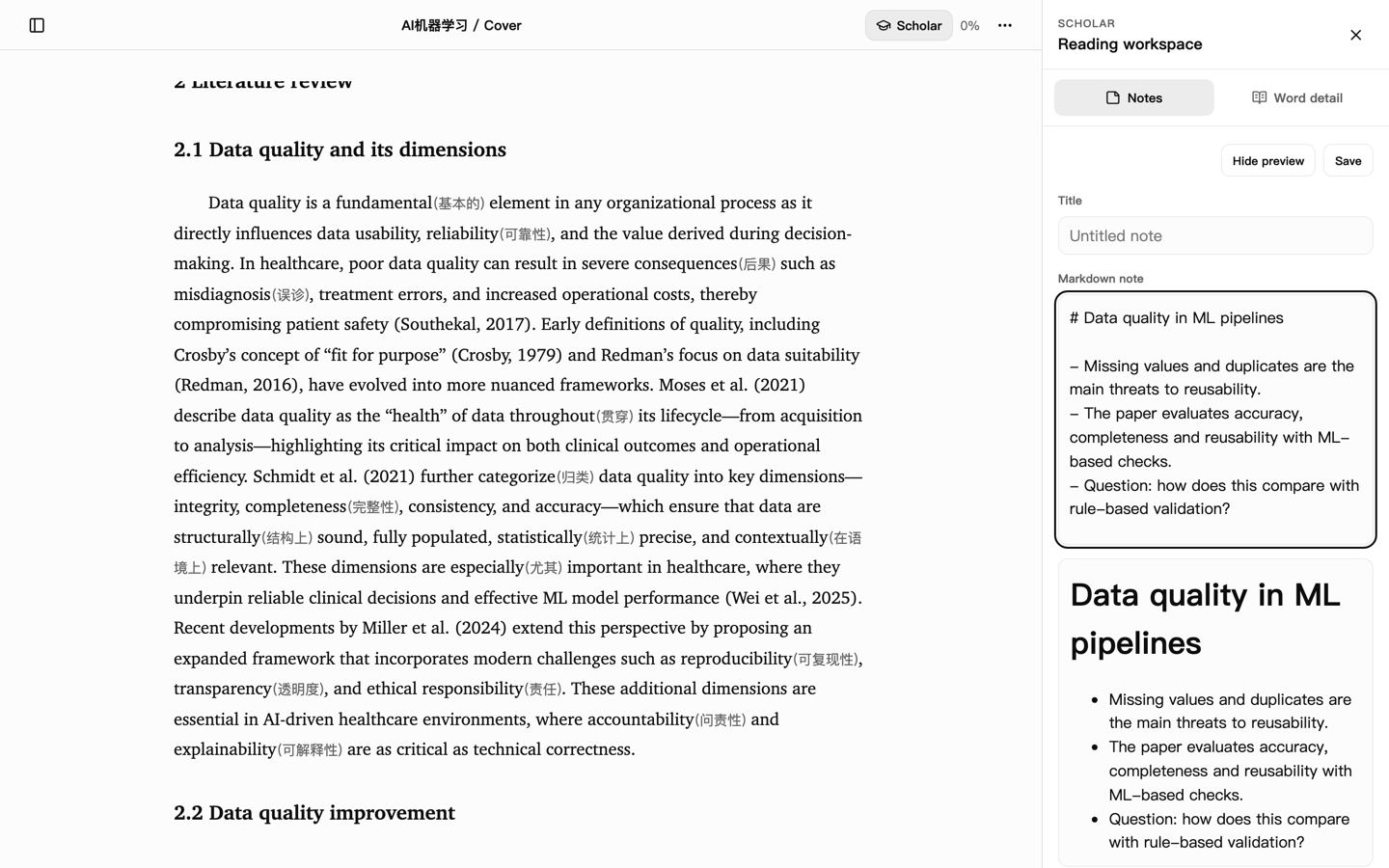
For study, research and writing. Scholar mode opens a panel beside the reader so the notes live next to the text they came from.

Available today

  • A fixed side panel beside the reader, one Markdown note per book with safe preview and explicit save
  • View details on any predicted word for a fuller, read-only explanation in context
  • Everything in the free reader, plus AI translation and PDF processing without limits

Coming next Coming

  • Completion that knows what you are reading: the note suggests the next phrase from the paper or book in front of you
  • A profile that steers it, such as "graduate student, writing my first paper", so suggestions and note organization fit your work
  • Write in your own language and the book's terms you mention arrive with their gloss and a link back to the page
Solaread reader with the Scholar side panel open showing a Markdown note
Scholar mode: the note panel beside the reader.

Who it is for

Built for the reading you have to do, and the reading you want to do

Studying abroad

Papers, lecture notes and textbooks, without the lookup loop

Course readings are dense with terms you have to understand, not just recognize. Solaread translates the ones you do not know inside the line, explains them in context on hover, and keeps the ones you save. By exam week the vocabulary is familiar because you met it where it lives.

I have ADHD, and my attention does not survive interruptions. Reading an English paper, I would copy a word, paste it into a translator, carry the meaning back to the sentence. Two clicks, a keyboard trip, again and again. Each one was a door: TikTok, a bathroom break, a game, and the paper was forgotten.

I built Solaread so the help would come to the line instead of me going to it. The words I need are translated where they are. The terms from my courses stopped being flashcards and started being things I understood. Passing became easier because reading became possible.

— Patrick, founder of Solaread

Reading for pleasure

Read the original and meet the author

A translated edition is only as good as its translator, and some are hard to bear. With Solaread you can read the book as it was written. The gloss appears for the words you would have stumbled on and stays out of the sentences you already own. The insertion is designed not to break your reading, and the more you read, the less of it you see.

Roadmap

Where Solaread runs today, and where it is going

Honest statuses. Nothing below is a promise of a date.

  • Available now

    Web

    Solaread runs in your browser today. Nothing to install.

  • Coming soon

    Windows

    A desktop app for Windows is in the works.

  • Coming soon

    macOS

    A native Mac app is on the way.

  • Coming soon

    iPhone and iPad

    A native app for iPhone and iPad, including the new iPhone Duo, is coming to the App Store.

  • Coming soon

    Chrome extension

    Save articles and YouTube transcripts to your bookshelf. In beta testing, coming to the Chrome Web Store.

  • Planned

    E-ink devices

    Dedicated support for e-ink readers, tuned for slow refresh and high contrast.

  • Planned

    Podcast import

    Bring podcast episodes into your bookshelf as text, the way YouTube transcripts work today.

  • Coming soon

    More languages

    Interface in Chinese, Japanese, Korean and French, with more annotation languages to follow.

Pricing

Free to start. Scholar Plus when you need more.

Subscriptions are managed inside the app. This page is only here so you know what you are getting.

Reader Plus

Coming soon

Coming soon

Everyday reading with personalized translation.

FAQ

Good to know

What is Solaread?

Solaread is a reader for books, papers and articles written in a language you are still learning. You import what you want to read, and Solaread translates only the words it predicts you do not know, right inside the line. Everything else is left as the author wrote it.

It runs in your browser today and is free to start.

How does Solaread decide which words to translate?

A personalized prediction model. After a vocabulary test of about 30 seconds, Solaread has an estimate of your general level and, if you choose, your level in professional fields such as law, medicine or computer science.

Every book is then scanned against that estimate. The words you probably do not know get a gloss; the rest do not. As you read and react, by saving words or marking them known, the model adjusts. As your vocabulary grows, it translates less.

Which file formats can I read?

EPUB, TXT and PDF. PDF papers are parsed into readable text where possible; when a page cannot be reconstructed faithfully, Solaread shows it in a page-faithful fallback view instead of guessing.

With the Chrome extension (in beta testing), web articles and YouTube transcripts can be sent to your bookshelf as text.

Let reading be reading.

Open Solaread in your browser, take the 30-second vocabulary test, and start the book you have been putting off.